 ASO Studio
Track your analytics and your keywords
Your downloads tell you what happened. Your keyword ranks tell you why. Put them on one screen and you know what to do next.
The short answer
Track both, side by side. Your keyword ranks show how people find your app, and your analytics show what they do once they have it. Apart, each one leaves a question open: a drop in downloads with no cause, or a rank that climbed with no proof it paid. Together, every move has a reason and a result.
See ASO Studio ConnectA new listing goes live. The rank climbs, downloads follow, and the new users stay.
Why both
Six reasons to track both.
Each one comes with the thing to check for your own app.
- 01
Downloads say what happened. Ranks say why.
A week of fewer downloads with no cause in sight is a guess. Put the same week beside your ranks and the answer is often there: the keyword that brought most of your installs slid from 3rd to 11th.
Your ranks and your downloads, on the same days.
- 02
Most downloads start in search
Apple says close to two thirds of App Store downloads come right after a search. Your place in those results decides how many people see the app at all, before the icon or a single screenshot gets a chance.
Where you rank for the keywords that bring people in.
- 03
A rank is worth what the search is worth
Third place on a search nobody types brings nothing. Twelfth on a search thousands of people make each day can bring more than the rest combined. Read every rank beside the demand behind it, so you celebrate the wins that pay.
Each keyword's demand and difficulty, a tap away.
- 04
Impressions and conversion split the problem in two
Few impressions means people are not finding the app, and the fix is in your keywords. Plenty of impressions and few downloads means people find it and pass, and the fix is in the icon, screenshots or ratings.
Impressions, conversion and downloads, against the range before.
- 05
A download only counts if the person stays
Installs that open the app once and leave grow nothing. Your own analytics show who came back after a day, a week and a month, so a jump in downloads is judged by the users it kept.
Active users and retention from PostHog, Amplitude or Mixpanel, beside downloads.
- 06
Every release is a test you can read
A new title, subtitle or keyword field moves your ranks over the one to two weeks after it goes live. With the history in place, you see what the change did, and keep it or try the next one.
Ranks over 7, 30 and 90 days, and every version's live date in Track Record.
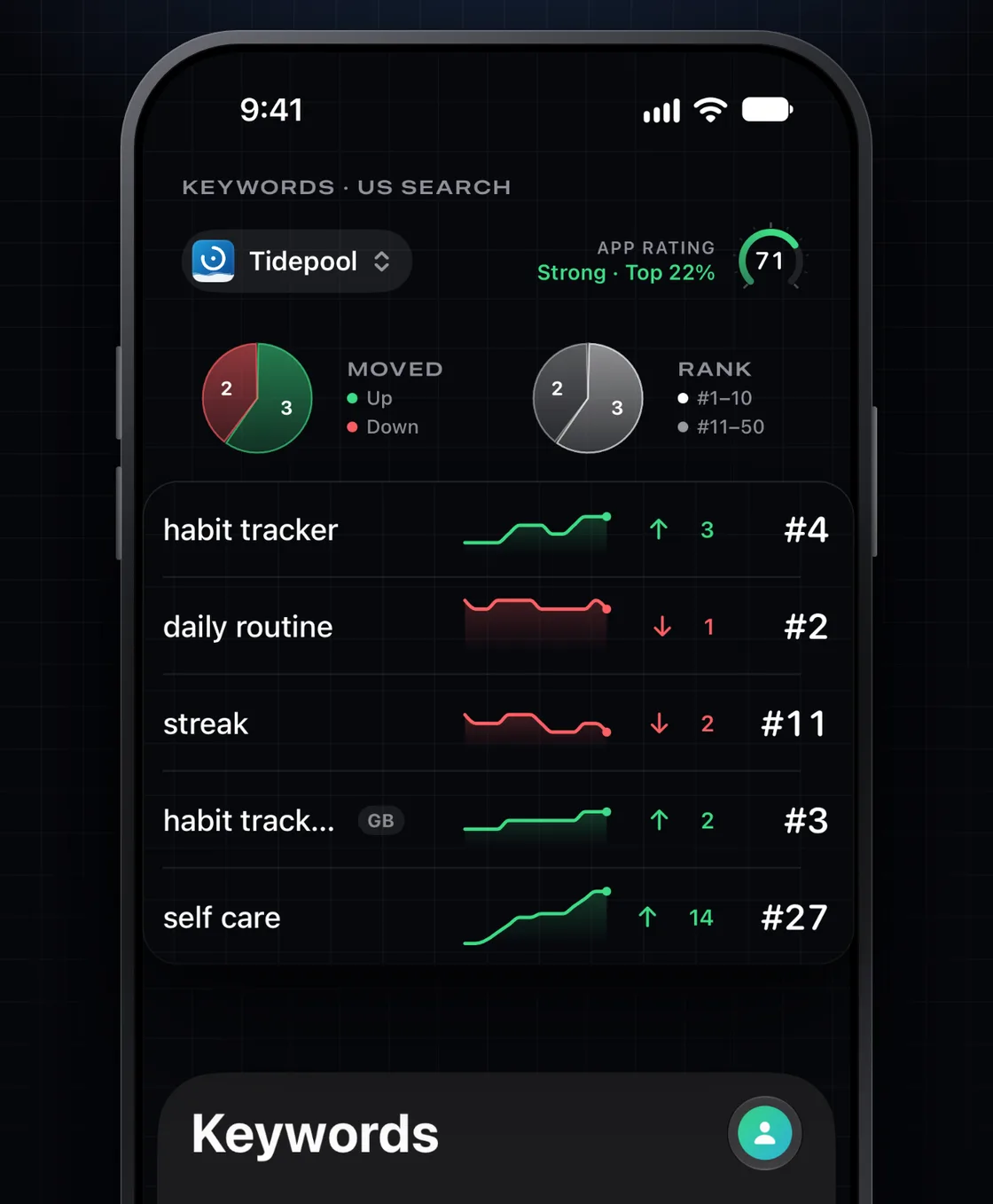
Keywords
Know where you rank, every morning.
ASO Studio Connect tracks your keywords on iPhone and iPad. Each rank shows how it moved, and an alert tells you the day one slips.
- Every keyword you track, with its rank and its move over 7, 30 or 90 days.
- Discover finds the keywords your listing already ranks for.
- An alert when a rank moves or a competitor changes its name, subtitle or screenshots.
Analytics
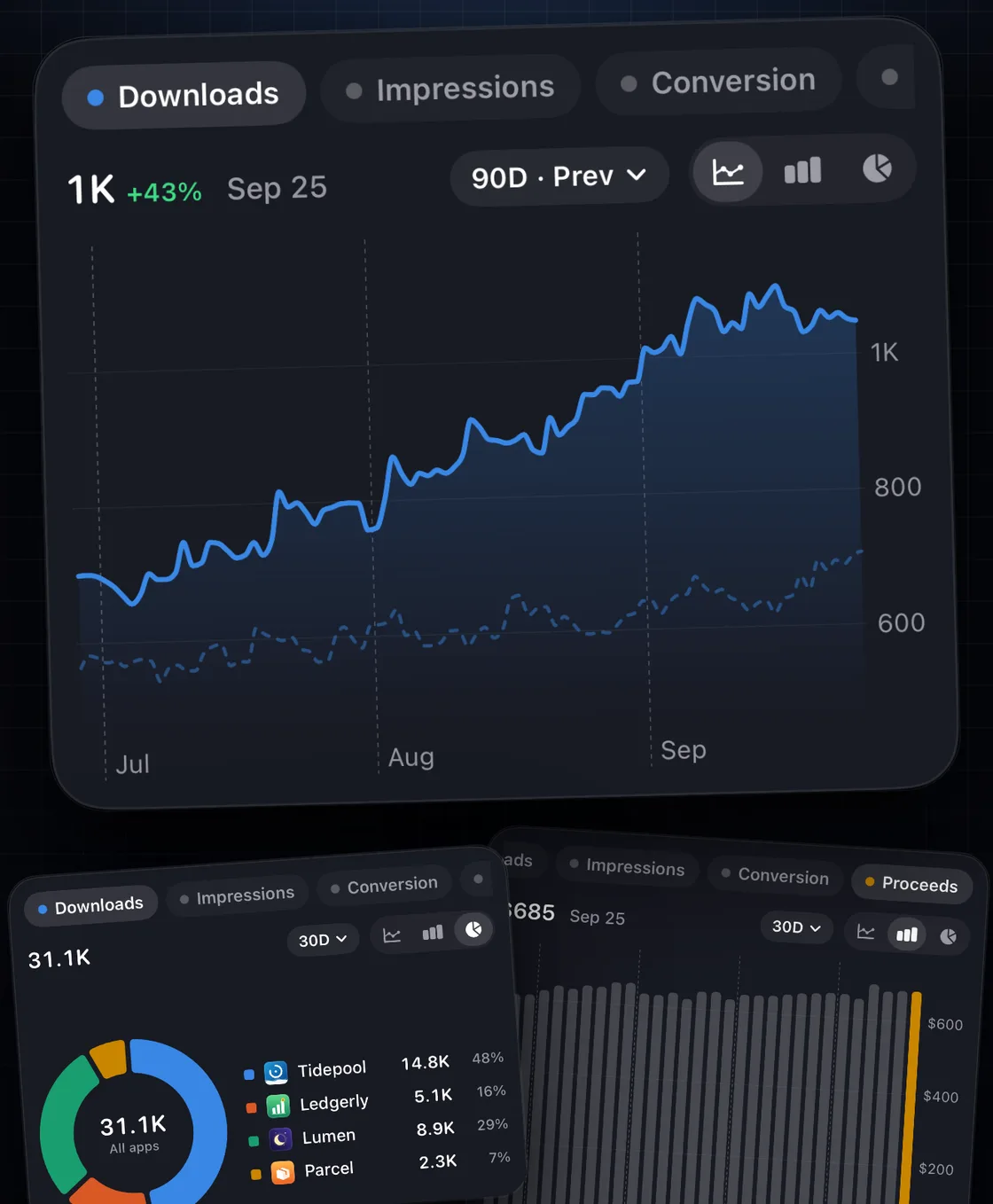
Your numbers beside your ranks.
Your App Store Connect numbers and your own analytics, laid out for a phone. Read the same days side by side and see what each rank move did.
- Downloads, impressions, conversion and proceeds by country, against the range before.
- Active users and retention from your own PostHog, Amplitude or Mixpanel.
- RevenueCat pings and MRR, beside your downloads.
The routine
Glance daily. Decide weekly.
A daily look catches a slip while it is cheap to fix. A weekly read shows which moves held.
- Each morning: yesterday's downloads against the same day last week.
- Each morning: any keyword that moved more than a few places.
- Each week: which moves held, and what they did to downloads and active users.
- Each release: what the new listing did to your ranks over the next two weeks.
Related questions
What people ask next.
Why should I track my app's keyword rankings?
Most App Store downloads start with a search, and your rank decides who sees the app.
Apple says close to two thirds of App Store downloads come right after a search. Your rank on the keywords people type decides how many of them see your app at all. Tracking those ranks every day shows when one slips, which competitor passed you, and whether a listing change worked.
What app analytics should I track?
Four App Store numbers and two of your own. From App Store Connect: impressions, product page conversion, downloads and proceeds. From your analytics tool: active users and retention. Together they show whether people find the app, choose it, stay and pay.
How often should I check my analytics and keyword ranks?
Glance every day and decide every week. A daily look catches a slipping keyword or a drop in downloads while it is cheap to fix. One day's move is often noise, so change your listing on what held for the week.
Can I track keyword ranks and App Store Connect analytics on iPhone?
Yes. ASO Studio Connect reads your App Store Connect account with your own API key and shows downloads, impressions, conversion and proceeds by country, beside the rank of every keyword you track. It is a native app on iPhone and iPad.
Does ASO Studio Connect work with PostHog, Amplitude or Mixpanel?
Yes, with Pro. Connect your own PostHog, Amplitude or Mixpanel project and ASO Studio Connect shows active users and retention next to your App Store numbers. Your sign-in and keys stay in your device's Keychain.
Is keyword tracking part of the free plan?
Keyword ranks, rank alerts and analytics are part of Pro, from $4.99 for a launch week or $39.99 a year with a 3-day free trial. The free plan follows one app through App Review and includes five ASO tools for your listing. Every ASO Studio subscription includes Pro.